Sometimes you only want to display content for certain visitors on a WordPress site. Not for everyone, but only for those who come via a certain channel, have clicked on a certain link or are currently travelling in a certain context.
GenerateBlocks Pro makes exactly that possible, without JavaScript, without an additional plugin and without much configuration.
What are conditions?
With version 2.3, GenerateBlocks Pro introduced the Conditions function. Since then, you can define the conditions under which each block is visible. This is called Conditional Display, and there is much more to it than meets the eye.
In addition to conditions such as login status, user role or device type, there is a particularly practical option: query parameter. This can be used to check whether a certain URL parameter is present when the page is called up. A block is then only displayed if this is the case.
UTM parameters as an example
A specific use case: A visitor arrives at a page via a QR code. The URL contains the parameter utm_source=qr-code. A condition can now be used to display a block just for these visitors, for example a welcome banner, a context-dependent notice or a special offer.
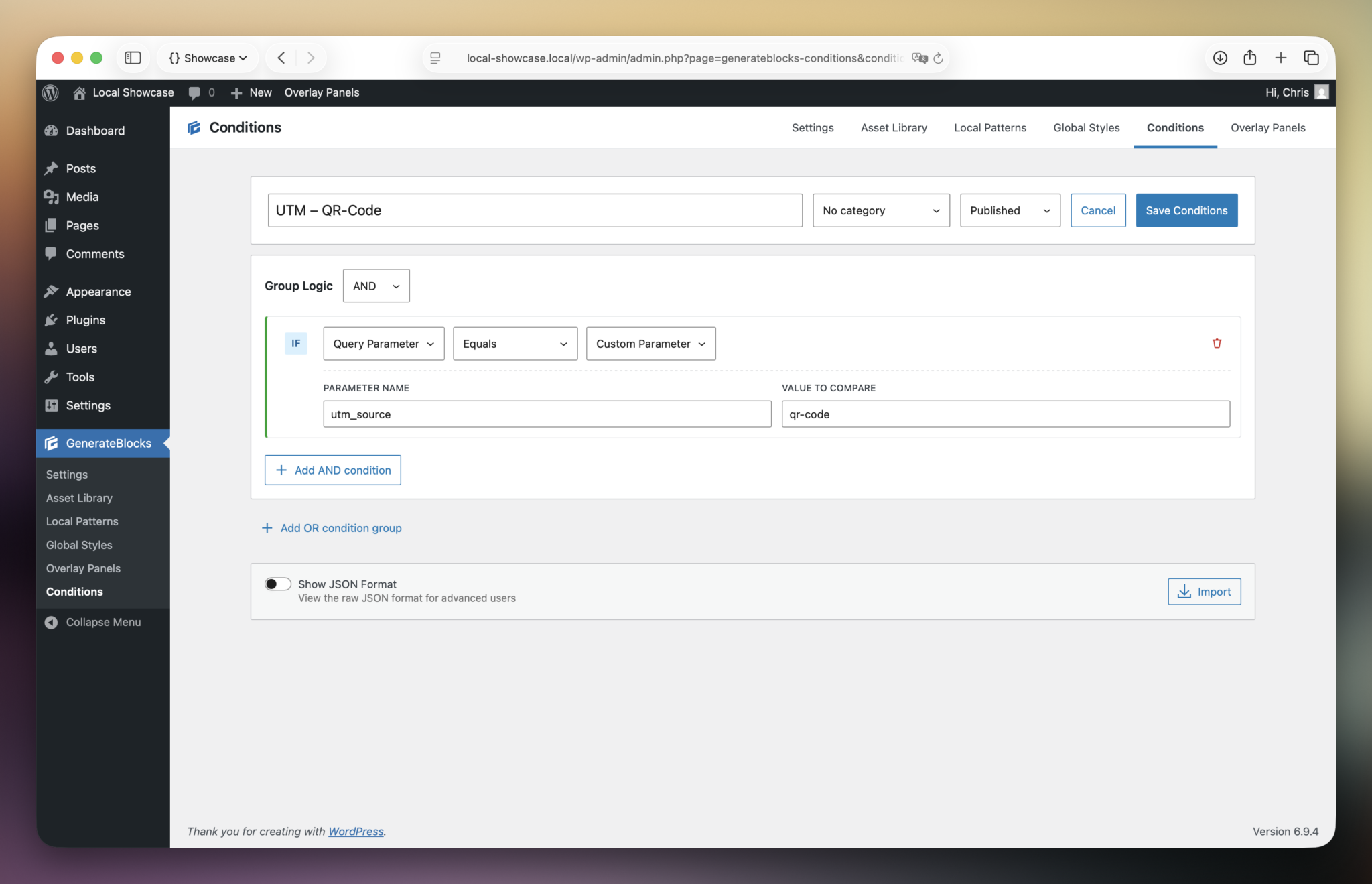
The setting for this is manageable:
- Condition Type: Query Parameter
- Operator: Equals
- Parameter name:
utm_source - Value to Compare:
qr-code
The block only appears if utm_source=qr-code is in the URL. Anyone accessing the page directly or via another channel will not see it.
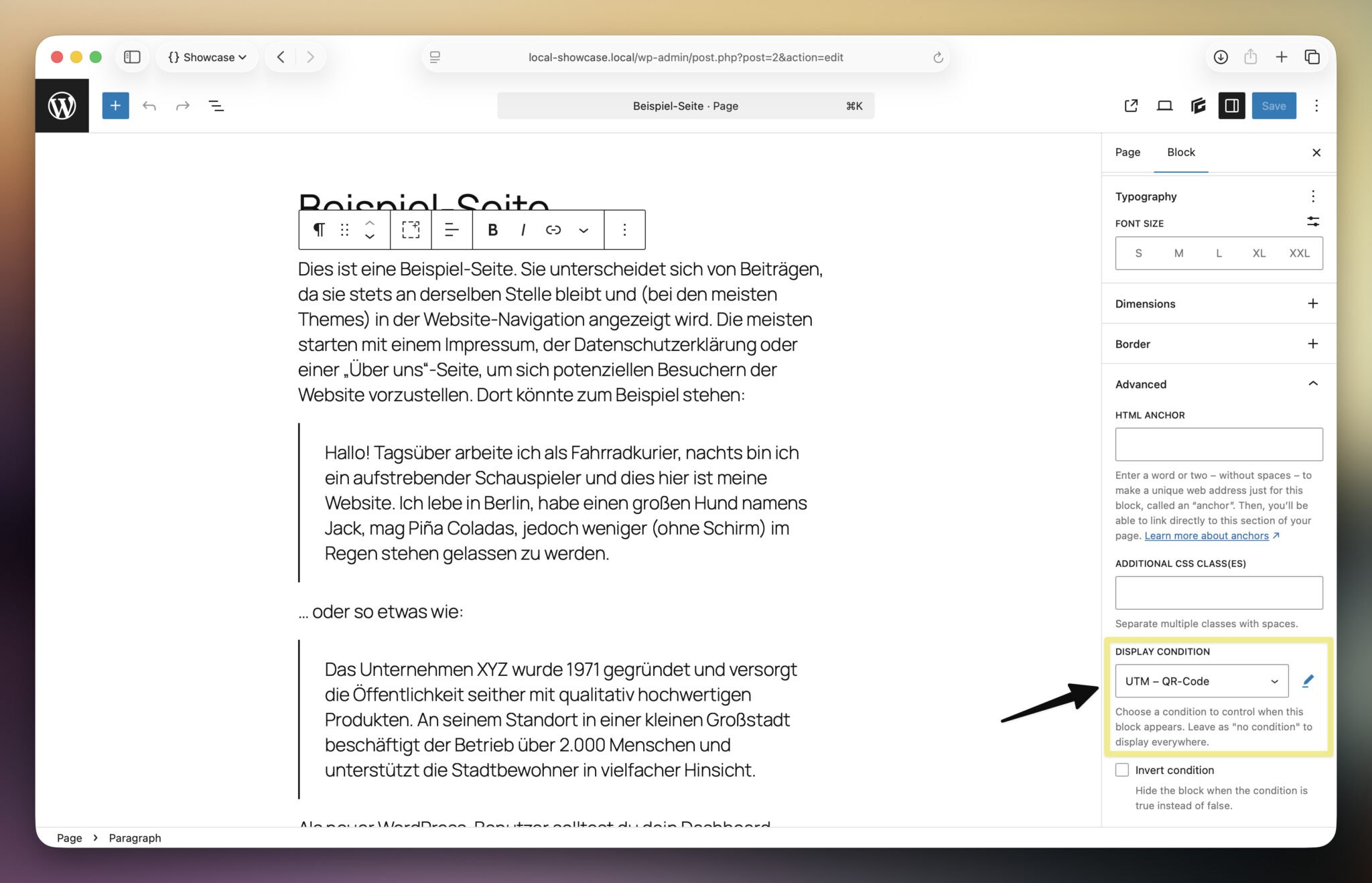
A few things you should know
Equals is more precise than Has Value. With Has Value, the condition applies to any value of the parameter. This is rarely what you really want. Equals ensures that only the exact value counts.
The parameter name is entered in the fieldwithout ? Only enter the pure key, i.e. utm_source, not ?utm_source.
UTM parameters must be placed before any anchor fragment. If you work with jump labels on the page, the URL must be structured as follows: .../?utm_source=qr-code#section. The browser does not send anything after the #, otherwise the parameter would simply not arrive.
Testing is easy. Call up the URL directly with the corresponding parameter in the browser. If the block appears, the condition is working.
Why query parameters and not referrers?
The referrer sounds like a similar solution, but it is not. For direct calls via QR code, NFC or typed URL, the referrer is empty. Query parameters are part of the URL itself and work regardless of how the page is accessed.
What is possible with it
This is just one example. Conditions in GenerateBlocks Pro can be used for many other scenarios: Content only for logged-in users, different content for certain user roles, specific notices for mobile visitors. The logic always remains the same. You define a condition and the block behaves accordingly.
For me, this is one of those moments when a tool simply does what you need it to do, without any detours. I’ll be showing small, practical things like this here more often because I’m always looking for something like this myself and am happy when someone has written it down briefly and specifically.
What interests you about GenerateBlocks Pro? Feel free to write it in the comments, maybe I can help or it will be the next post.